Note
This blogpost is retroactively dated to coincide with the date it was posted by me on a Russian forum (IYKYK).
Introduction
Most modern CPUs are compatible because they share the same ISA1. The most common ISA today is x86_64, a 64-bit extension of the older x86 architecture. The need for more complex and faster operations, especially on floating-point arithmetic, has led to extensions such as SSE2 and AVX3.
These extensions comprise several versions which enable the processor to interpret different sets of opcodes. SSE goes up to version 4.2, with an AMD-exclusive 4a version. AVX goes up to AVX-512, but the more common extension set in COTS4 CPUs is AVX-2.
When compiling software it's possible to set a flag that dictates whether the resulting machine code will be compatible with a specific set of extensions. This choice can lead to better performance because the extensions can perform certain operations using fewer CPU cycles.
However, older CPUs which are perfectly capable of running modern software may have been introduced to the market before the latest extensions were available. As such, software compiled with these newer instructions simply cannot execute on them at all.
Detecting Extension Support
The description of these extensions is included in CPUID flags. The easiest way to check if your CPU supports specific instructions is through CPU-Z:
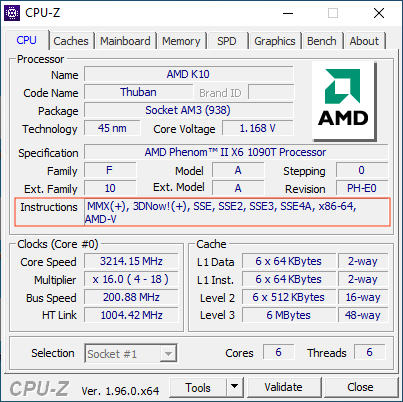
You can also simply try running the software. It may display a pop-up saying it's not compatible, or just crash silently. Check Windows Event Viewer for error code 0xC000001D, which indicates an illegal instruction was attempted.
Patching Process
I'll describe the patching process I used to bypass these instructions for the game Days Gone. This is my method and not necessarily optimal, but it works. Note that even legitimate purchasers of the game couldn't run it on slightly older processors—by patching a few instructions I was able to make it compatible.
Running the game produces an immediate CTD5 with the process vanishing from Task Manager. There are no warnings or indications of the issue.
Setting Up the Debugger
Load the game in x64dbg and set a breakpoint on EXCEPTION_ILLEGAL_INSTRUCTION. This exception is raised when the processor encounters an unknown opcode:
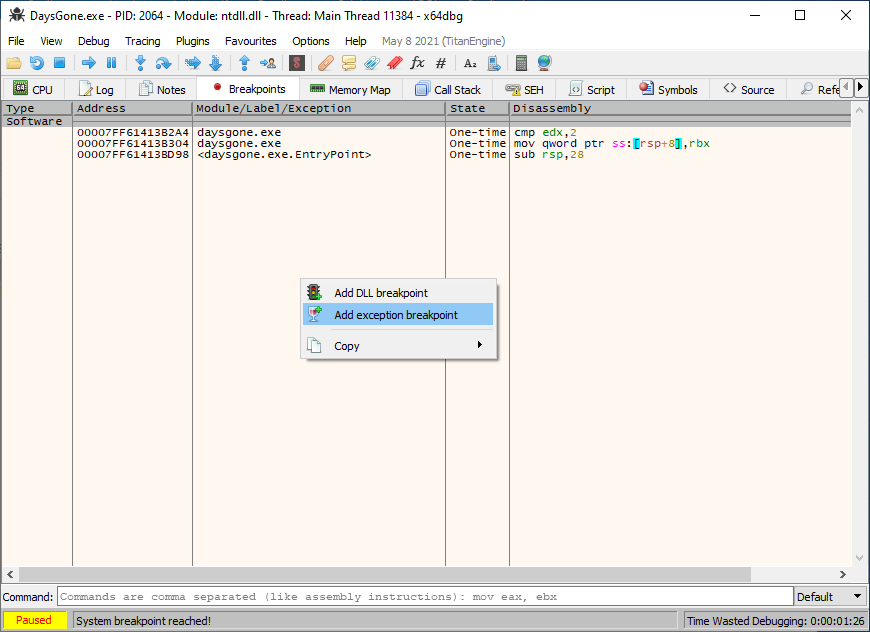
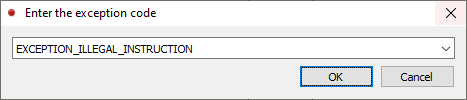
Run the game until this breakpoint is hit. You may encounter other breakpoints—continue until you hit the one for the invalid instruction. Note that different processors may have different sets of available extensions and thus be able to interpret different opcodes.
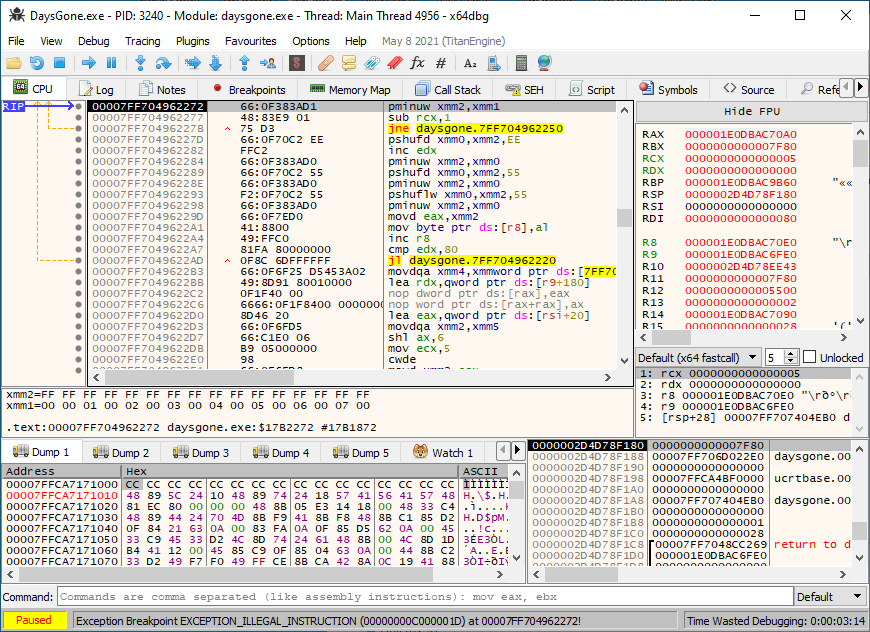
Notice how the lower status bar shows it stopped at the EXCEPTION_ILLEGAL_INSTRUCTION breakpoint. We're now at an unsupported opcode.
First Attempt: NOPing
I usually first try to NOP6 the instruction (Right click → Binary → Fill with NOPs). This may or may not work depending on the instruction and the software. Games often use these instructions for decoding video content like credits or cutscenes.
However, simply NOPing the instruction may break the software. If that's the case, we need to replace these instructions with equivalent ones using opcodes available on our CPU.
Finding Equivalent Instructions
A search for the pminuw instruction led to this helpful resource which provides SSE2-compatible substitutes:
SSE2 compatible PMINUW implementation
;   xmm0 = in|out
;   xmm1 = in
;   xmm7 = temporary
movdqa xmm7, xmm0    ; Move xmm0 to temporary
psubusw xmm7, xmm1   ; Subtract with unsigned saturation
psubw xmm0, xmm7     ; Subtract (no saturation, would never overflow here)
This means we can replace our instruction with these 3 instructions to achieve SSE2 compatibility. However, our current instruction is only 5 bytes (66:0F383AD1) and we need 3×4 = 12 bytes for the replacement. How do we fit that?
Using Code Caves
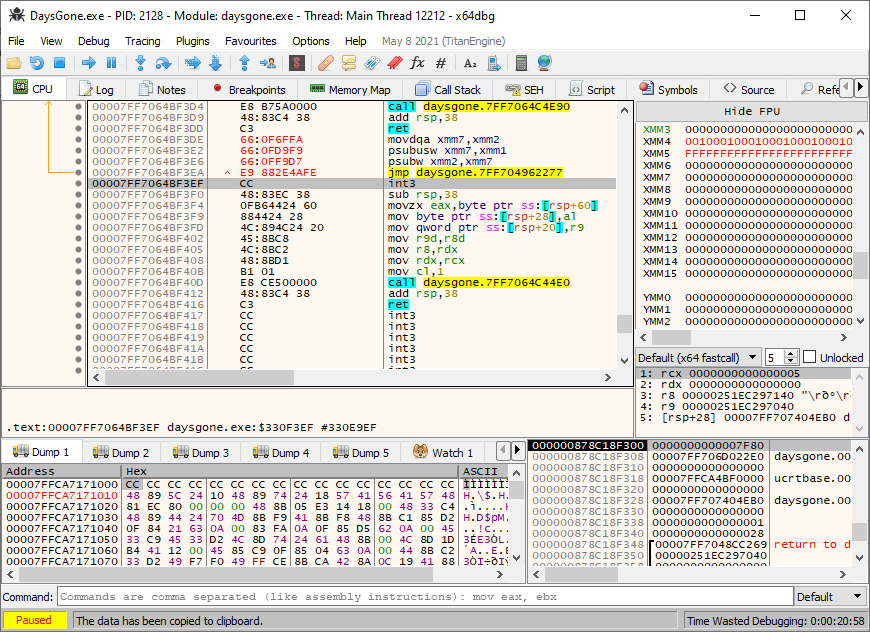
We can jump to another location that can fit these instructions, then jump back to continue execution. First, calculate the space needed:
movdqa  : 4 bytes
psubusw : 4 bytes
psubw   : 4 bytes
jmp     : ≤5 bytes
We need approximately 17 bytes of free space. Search for a "code cave"—an unused area in the executable section. Do a pattern search for 17 consecutive CC bytes, or scroll around to find an empty area:
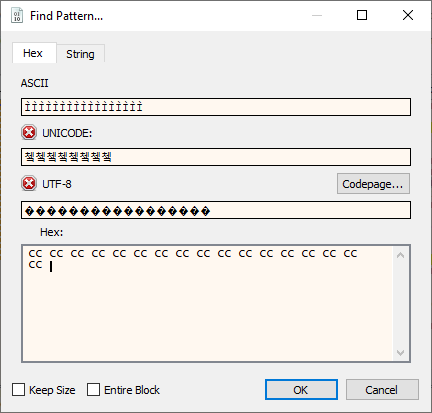
Open the first result and write the replacement instructions. At the end, add a jmp back to the instruction following the one we replaced. Remember to adjust registers accordingly and verify the temporary register isn't being used elsewhere:
Completing the Patch
Replace the original instruction with a jmp to our code cave:
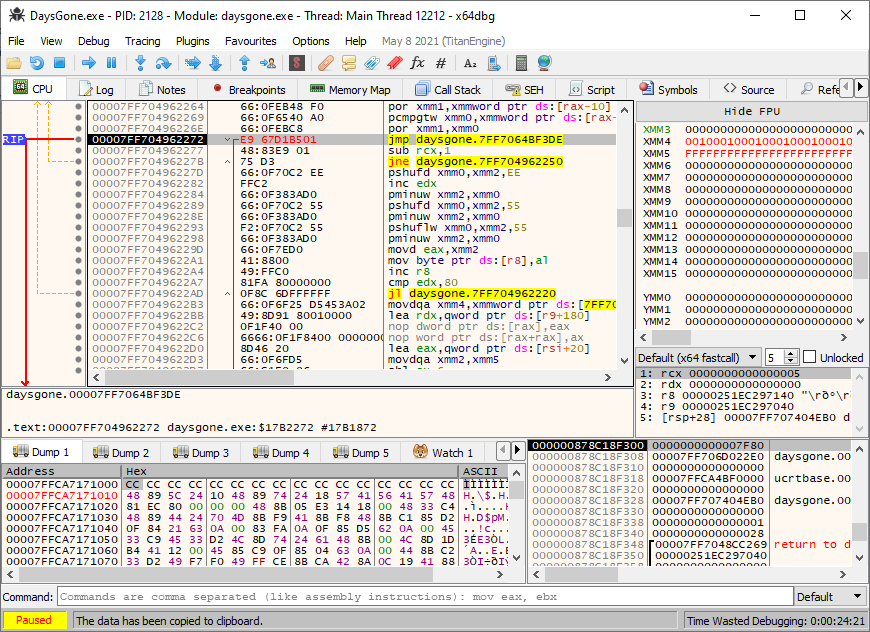
That's it. Rinse and repeat until no more breakpoints are hit. For Days Gone, I replaced 12× pminuw instructions and 2× pmaxud instructions. Some instructions I couldn't find easy replacements for, so I just NOPed them—and it worked.
Summary of Steps
- Identify the issue: Check CPU-Z for supported instruction sets, or look for error code
0xC000001Din Windows Event Viewer - Set up debugger: Load the executable in x64dbg and set a breakpoint on
EXCEPTION_ILLEGAL_INSTRUCTION - Find unsupported instructions: Run until the breakpoint hits to identify the problematic opcode
- Try NOP first: Sometimes simply filling the instruction with NOPs works
- Find equivalent instructions: Search for SSE2-compatible alternatives for SSE4.x instructions
- Locate code caves: Search for empty space (
CCbytes) in the executable - Patch the code cave: Write the replacement instructions followed by a jump back
- Replace original instruction: Change it to jump to your code cave
- Repeat: Continue until all illegal instructions are patched
Games Requiring SSE4.1/4.2 Instructions
List compiled by mafia47 (some games also require AVX)
| Game | Status |
|---|---|
| Sunset Overdrive | No fix yet |
| Journey | Fix: disable cloth interpolation (latest version only) |
| Metal Slug XX | No fix yet |
| Beyond: Two Souls | Playable with Intel SDE7 |
| Detroit: Become Human | Fix available |
| Control Ultimate Edition | No fix yet |
| Yakuza 3, 4, 5, 6 | No fix yet |
| Yakuza: Like a Dragon | No fix yet |
| Horizon Zero Dawn | Fix for Steam v1.0.9.3 only |
| Days Gone | Fix for v1.0 only |
| Little Nightmares | Playable with Intel SDE |
| Unravel Two | Playable with Intel SDE |
| Death Stranding | No fix yet |
| Cyberpunk 2077 | Fix for GOG v1.22 (requires testing) |
| Red Dead Redemption 2 | Fix for cracked version only |
| Nioh 2 | No fix yet |
| God Eater 3 | No fix yet |
| Assassin's Creed Origins | Fix for v1.51 (not for Phenom CPU) |
| Assassin's Creed Odyssey | Fix for v1.5.3 (not for Phenom CPU) |
| Assassin's Creed Valhalla | No fix yet |
| Immortals Fenyx Rising | No fix yet |
| Far Cry 5 | Fixed by devs on latest version; no fix for older versions |
| Dead Rising 4 | No fix yet |
| Crash Bandicoot 4 | No fix yet |
| Saints Row The Third Remastered | No fix yet |
| DOOM Eternal | Fix for Denuvo-less exe only (not for Phenom CPU) |
| Need for Speed Heat | No fix yet |
| NBA 2K21 | No fix yet |
| Shadow Man Remastered | Playable with Intel SDE |
| Biomutant | No fix yet |
| Outriders | No fix yet |
| Puyo Puyo Tetris 2 | Fixed by devs |
| Diablo II Resurrected | No fix yet |
Closing Thoughts
I'm sure there are better approaches—either automating through scripts or using specialized debugger plugins. I'm also working on a generic emulator that could help us continue using older but perfectly capable CPUs.
Please share any fixes you develop and tips for patching. Spreading this knowledge helps everyone keep their hardware useful for longer.
Footnotes
-
Instruction Set Architecture—the set of instructions a processor can understand and execute. ↩
-
Streaming SIMD Extensions—SIMD stands for Single Instruction, Multiple Data, allowing parallel operations on multiple data points. ↩
-
Advanced Vector Extensions—provides wider registers (256-bit and 512-bit) for even more parallel processing capability. ↩
-
Commercial Off-The-Shelf—standard consumer hardware as opposed to specialized or custom processors. ↩
-
Crash To Desktop—the application terminates abruptly without any error dialog. ↩
-
NOP (No Operation)—an instruction that does nothing. Filling code with NOPs effectively removes its functionality while maintaining the byte alignment. ↩
-
Intel Software Development Emulator—can emulate missing instructions but with significant performance overhead. ↩